

Updated Aug 23, 2024 Verified MB-820 dumps Q&As - 100% Pass
New 2024 Latest Questions MB-820 Dumps - Use Updated Microsoft Exam
NEW QUESTION # 13
A company has a Business Central online environment.
You are exporting a file from a client by using the DownloadFromStream method.
You need to create an InStream data type to send the data
Which solution should you use?
- A. Use OeatelnStream method for BLOB field of "TempBlob" table.
- B. Use CreatelnStream method for File type variable.
- C. Use OeatelnStream method from codeunit "Temp Blob".
Answer: C
Explanation:
When exporting a file from a client using the DownloadFromStream method in a Business Central online environment, you need to create an InStream data type to send the data. The solution is to use the CreateInStream method from codeunit "Temp Blob" (A). The Temp Blob codeunit provides temporary storage of BLOBs (Binary Large Objects) and is commonly used for handling files and streams in Business Central. By using the CreateInStream method on a Temp Blob, you create an InStream that can then be used with the DownloadFromStream method to send the file data to the client. This approach is efficient for file handling and transfer in Business Central, especially in scenarios involving data export or file manipulation.
NEW QUESTION # 14
You need to create the codeunit to read the POS terminal APIs.
How should you complete the code segment? To answer, select the appropriate options in the answer area.
NOTE; Each correct selection is worth one point.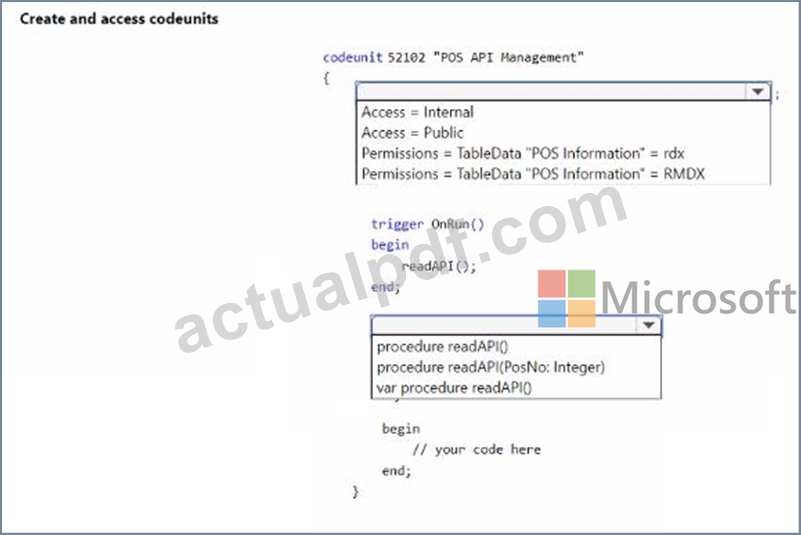
Answer:
Explanation: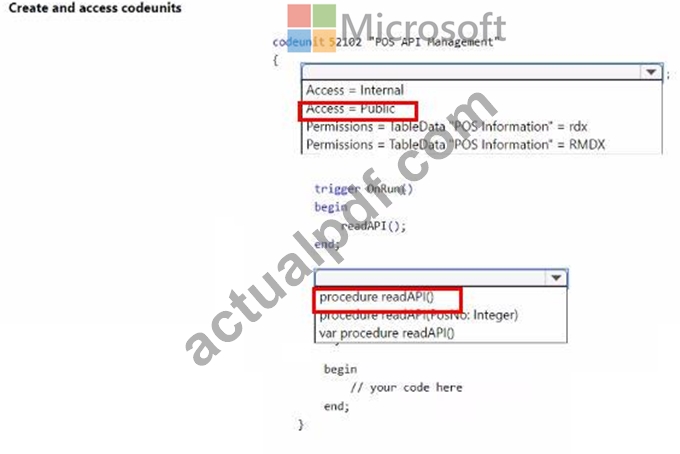
NEW QUESTION # 15
A company plans to integrate tests with its build pipelines.
The company has two Docket sandbox environments: SandboxA and SandboxB.
You observe the following:
* SandboxA is configured without the Test Toolkit installed.
* SandboxB must be configured from scratch. The Test Toolkit must be installed in SandboxB during configuration.
You need to configure the sandbox environments.
How should you complete the cmdlets? To answer, select the appropriate options in the answer area.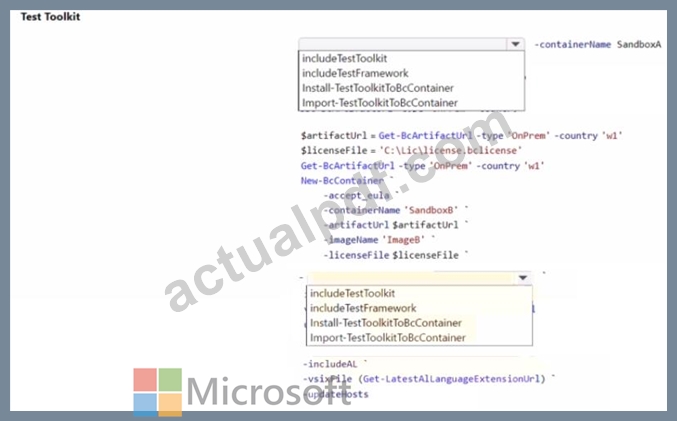
Answer:
Explanation: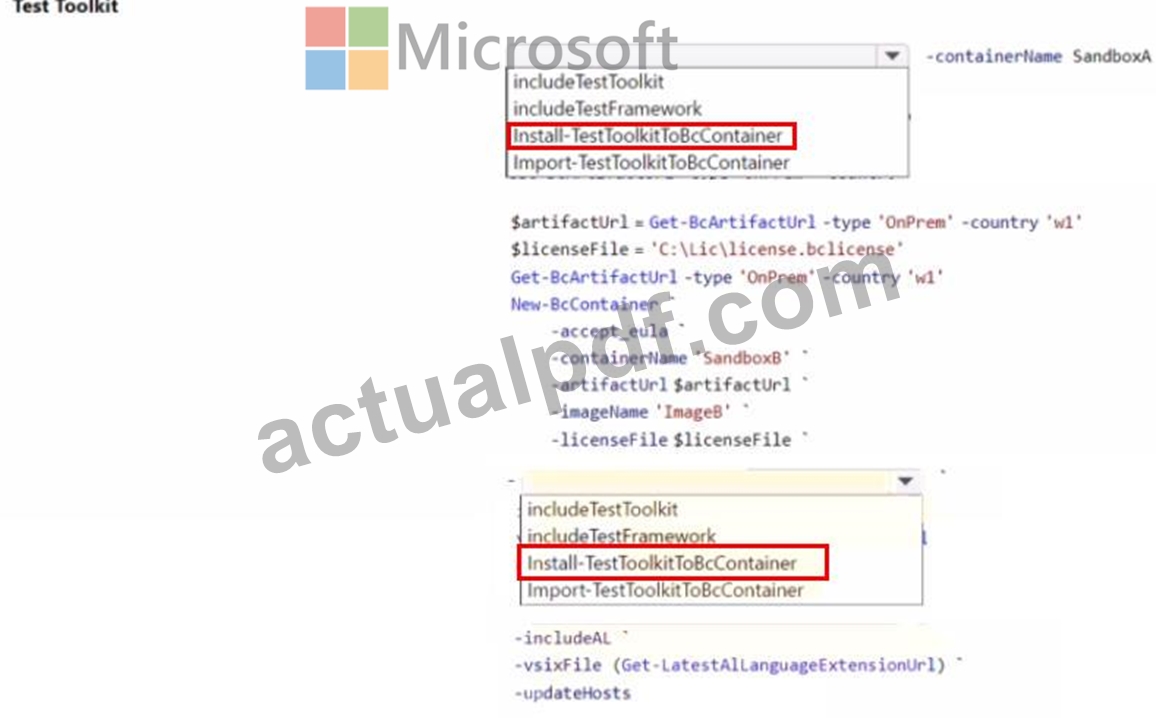
NEW QUESTION # 16
A company is deploying Business Central on-premises.
The company plans to use a single-tenant deployment architecture.
You need to describe how the data is stored and how the Business Central Server is configured.
In which two ways should you describe the single-tenant architecture? Each correct answer presents a complete solution.
NOTE: Each correct selection is worth one point.
- A. The application and the business data are stored in the same database.
- B. The application and business data are stored in separate databases.
- C. Multiple customers share multiple Business Central Server instances.
- D. Multiple customers share a single Business Central Server.
- E. Each customer has their own Business Central Server.
Answer: A,B
Explanation:
In a single-tenant deployment architecture of Business Central on-premises, the following characteristics describe how the data is stored and how the Business Central Server is configured:
The application and the business data are stored in the same database (B): In a single-tenant architecture, each tenant (which typically corresponds to a single customer) has its own dedicated database. This database contains both the application objects (such as pages, reports, codeunits, etc.) and the business data (such as customer, vendor, and transaction records). This setup ensures that each tenant's data is isolated and can be managed independently.
The application and business data are stored in separate databases (D): While (B) is a characteristic of a single-tenant deployment, it's important to clarify that in some configurations, the application objects can be stored in a separate database from the business data. This approach can be used for easier maintenance and upgrades of the application code without affecting the business data. However, each tenant still has its own set of databases, maintaining the single-tenancy model.
The other options provided do not accurately describe a single-tenant architecture:
Each customer has their own Business Central Server (A): This statement might be misleading. In a single-tenant deployment, while each customer has their own database, they do not necessarily have their own Business Central Server instance. Multiple databases (tenants) can be hosted on a single server instance, although they are not shared across customers.
Multiple customers share a single Business Central Server (C) and Multiple customers share multiple Business Central Server instances (E): These options describe a multi-tenant architecture rather than a single-tenant one. In a multi-tenant setup, multiple customers (tenants) can share the same server instance and even the same application database, with data isolation ensured at the application level.
NEW QUESTION # 17
You need to configure telemetry for the SaaS tenant and test whether the ingested signals are displayed.
Which three actions should you perform in sequence? To answer, move the appropriate actions from the list of actions to the answer area and arrange them in the correct order.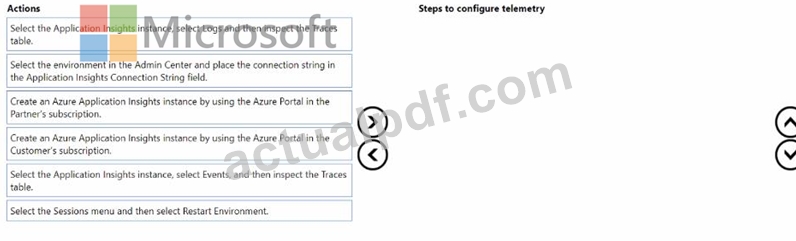
Answer:
Explanation:
1 - Create an Azure Application Insights instance by using the Azure Portal in the Customer's subscription.
2 - Select the environment in the Admin Center and place the connection string in the Application Insights Connection String field.
3 - Select the Application Insights instance, select Logs and then inspect the Traces table.
NEW QUESTION # 18
You are writing a procedure to block all inventory items with numbers that do not start with the letter S.
You need to complete the procedure.
How should you complete the code expressions? To answer, select the appropriate options in the answer area.
NOTE: Each correct selection is worth one point.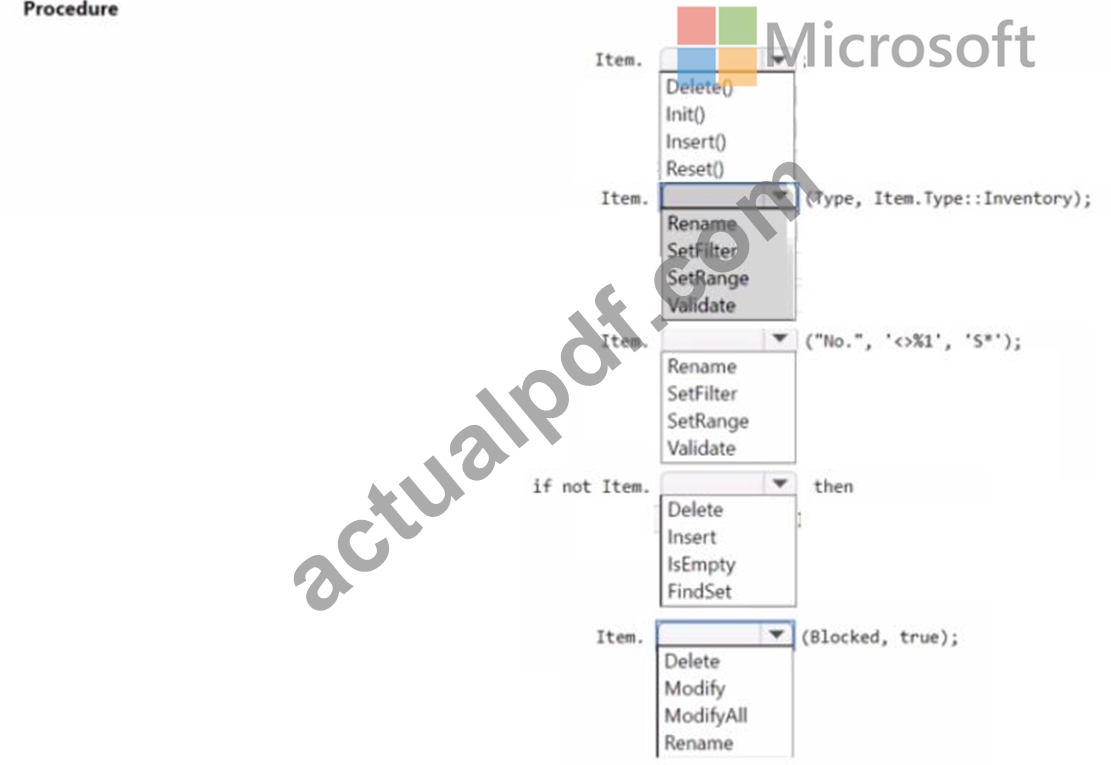
Answer:
Explanation: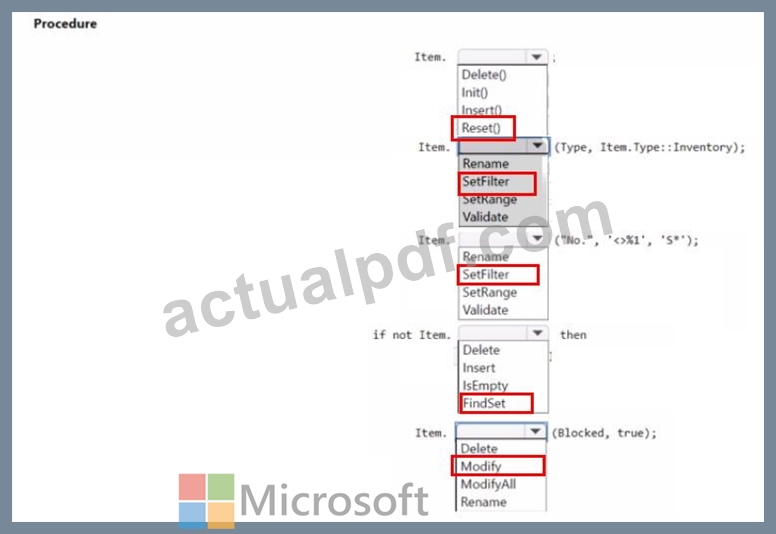
NEW QUESTION # 19
A company has a page named New Job Status connected to a source table named Job. The page has an action named Item Ledger Entries. The company requires the following changes to the page:
* Filter the page to display only jobs with open or quote status.
* Add the following comment for internal use: This page does not include completed jobs.
* Item Ledger Entries action must open the selected job on the page and display it in the Ul for users to modify.
You need to select the property selections to use for each requirement.
Which property selections should you use? To answer, select the appropriate options in the answer area.
NOTE: Each correct selection is worth one point.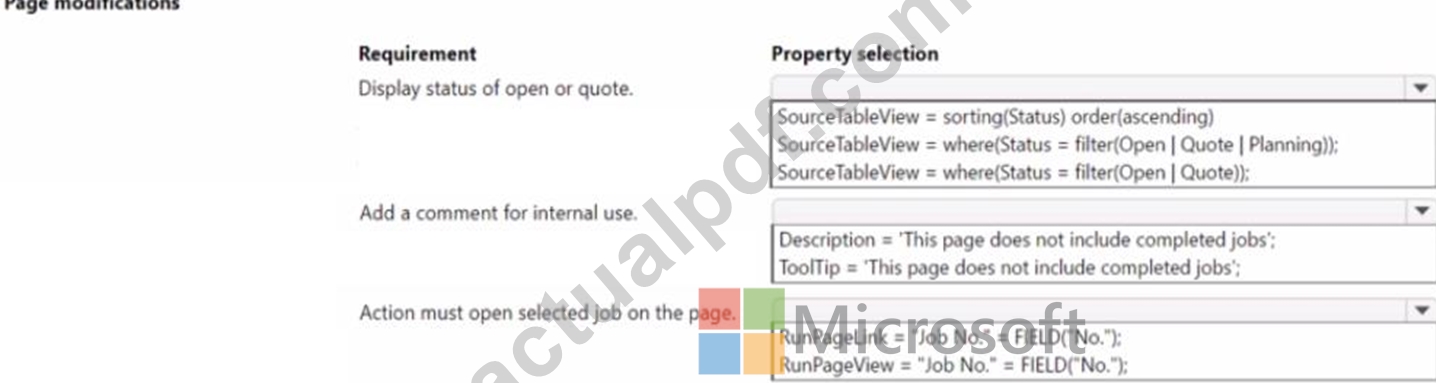
Answer:
Explanation: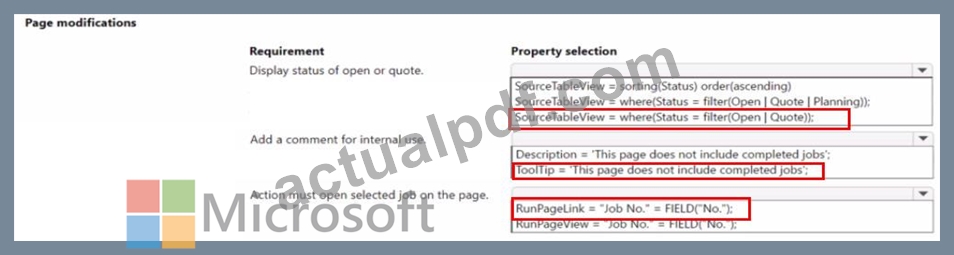
NEW QUESTION # 20
You are developing an app.
You plan to publish the app to Microsoft AppSource.
You need to assign an object range for the app.
Which object range should you use?
- A. custom object within the range 50000 to 99999
- B. divided by countries and use specific a country within the range 100000 to 999999
- C. custom object within the range 50000 to 59999
- D. an object range within the range of 7000000 to 74999999 that is requested from Microsoft
- E. free object within the standard range 1 to 49999
Answer: D
Explanation:
When developing an app for Microsoft AppSource, it is essential to use an object range that is specifically designated by Microsoft to avoid conflicts with other apps and the base application. The correct object range to use is:
An object range within the range of 70000000 to 74999999 that is requested from Microsoft (D): This range is reserved for AppSource apps. Developers need to request this range from Microsoft to ensure that the objects used in their extension do not conflict with those used by other extensions or by the base application. Using this reserved range helps maintain the integrity and compatibility of extensions published on AppSource.
It's important to note that the other ranges mentioned (A, B, C, and E) are not suitable for apps intended for AppSource. Ranges 50000 to 59999 and 50000 to 99999 are typically reserved for per-tenant customizations or partner solutions, not for distribution on AppSource. The standard range 1 to 49999 is reserved for the base application objects, and using an object range divided by countries (C) is not a standard practice for AppSource apps.
NEW QUESTION # 21
You create a codeunit that works with a table named Boxes. You plan to filter the records and then modify them.
You get an error that you do not have permission to work with the Boxes table.
You need to assign the Indirect permissions for the Boxes table to the codeunit.
Which four code blocks should you use in sequence to assign the correct permission? To answer, move the appropriate code blocks from the list of code blocks to the answer area and arrange them in the correct order.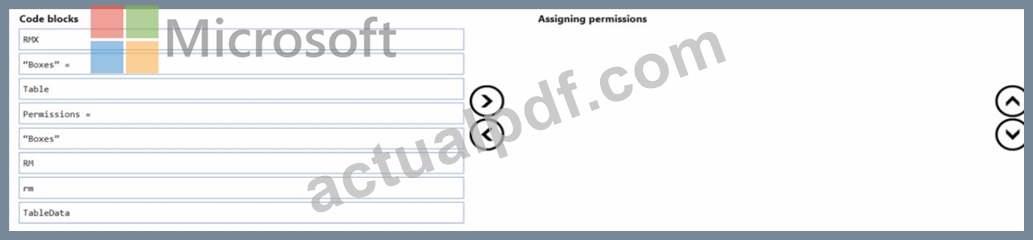
Answer:
Explanation: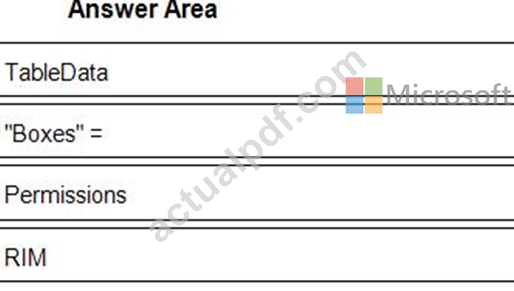
1 - TableData
2 - "Boxes" =
3 - Permissions
4 - RIM
NEW QUESTION # 22
You create a query that contains a procedure to display the top customers.
The procedure breaks at runtime.
You need to fix the code.
For each of the following statements, select Yes if the statement is true. Otherwise, select No.
NOTE: Each correct selection is worth one point.
Answer:
Explanation:
In summary, for the procedure to run correctly, the query must be opened after setting the filter and before attempting to read from it. The SetFilter method is correct for the intended operation, and there's no requirement to use SetRange or to enclose the Message call in a BEGIN .. END block.
NEW QUESTION # 23
You need to determine why the extension does not appear in the tenant.
What are two possible reasons for the disappearance? Each correct answer presents a complete solution.
NOTE: Each correct selection is worth one point.
- A. The extension was not compatible with the new version within 90 days of the first notification.
- B. The extension was published as PTE. and the Platform parameter was not updated in the application file.
- C. The extension was published as a DEV extension.
- D. The extension was published as PTE. and the Platform and Runtime parameters were not updated in the application file.
- E. The extension was not compatible with the new version within 60 days of the first notification.
Answer: D,E
Explanation:
In the context of Microsoft Dynamics 365 Business Central, an extension may not appear in the tenant for several reasons, particularly after an upgrade to a new major version.
Option A suggests that the extension was published as a DEV extension, which typically would not cause it to disappear after an upgrade because DEV extensions are intended for development and testing within sandbox environments.
Option B indicates that the extension was not compatible with the new version within 60 days of the first notification. This is a likely reason because Microsoft enforces compatibility rules, and extensions that are not made compatible within the specified timeframe might be removed or disabled.
Option C refers to the extension being published as a PTE (Per-Tenant Extension) and mentions the Platform parameter not being updated. This could cause issues, but not specifically the disappearance of the extension after an upgrade.
Option D expands on Option C by adding that both the Platform and Runtime parameters were not updated in the application file. This is a critical aspect because if these parameters are not correctly set to indicate compatibility with the new version of Business Central, the extension could be disabled or removed.
Option E is similar to Option B but mentions a 90-day period. This option does not align with standard Business Central practices for version compatibility requirements.
Therefore, the two possible reasons for the disappearance of the extension in the tenant after an upgrade are that the extension was not compatible with the new version within the required timeframe (Option B) and that the extension was published as a PTE without the Platform and Runtime parameters being updated (Option D).
NEW QUESTION # 24
You have the following XML file sample for the Items list: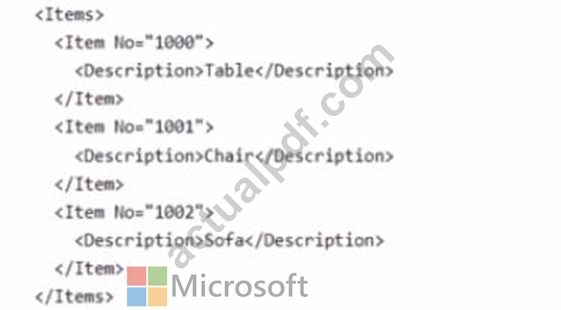
You plan to create the next XML file by using an XMLport object.
You need to complete the code segment to export the file in the required format How should you complete the code segment? To answer, select the appropriate options in the answer area.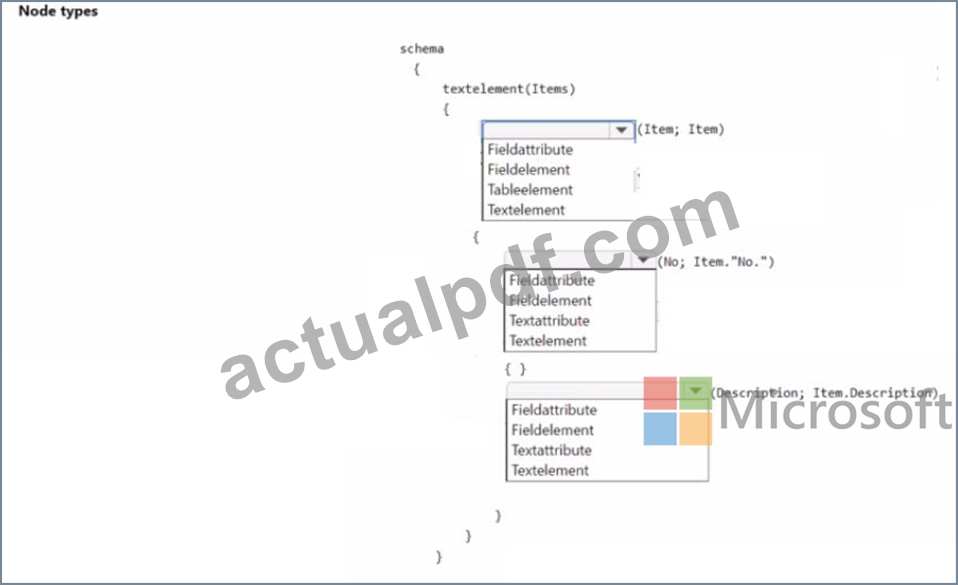
Answer:
Explanation:
NEW QUESTION # 25
A company uses Business Central.
The company plans to use a translation file in an extension. The extension has a caption that should not be translated.
You need to prevent the caption from being translated.
What should you do?
- A. Set the GenerateLockedTranslations feature in the appjson file.
- B. Add the Locked = true parameter to the Caption.
- C. Use the CaptionML property and copy the same caption for each language used.
- D. Delete the Caption property.
- E. Copy the same caption for each language in the translation file.
Answer: B
Explanation:
To prevent a caption from being translated in an extension for Microsoft Dynamics 365 Business Central, you should add the Locked = true parameter to the Caption (C). This parameter explicitly marks the caption as locked for translation, ensuring that it remains unchanged across different language versions of the extension. This approach is useful for specific terms, brand names, or other elements within the application that should remain consistent regardless of the user's language settings. Unlike the other options, which involve manual manipulation of the translation file or properties, setting Locked = true directly in the AL code provides a clear, maintainable, and error-proof method to exclude specific captions from the translation process.
NEW QUESTION # 26
You create a Business Central report.
You need to insert values on the Request page to be saved for the next time the report is run.
What should you do?
- A. Declare a Savevalues' variable and assign it to true on the OnOpenPage () trigger.
- B. Set the SaveValues property to true.
- C. Set the Transact! on Type property to Update.
- D. Set the Use Request Page property to true.
Answer: B
Explanation:
To ensure that the values inserted on the Request page of a Business Central report are saved for the next time the report is run, the SaveValues property (D) should be set to true. This property is available on the Request page of the report and, when set to true, allows the system to remember the values entered by the user, so they do not have to re-enter them each time they run the report. This feature enhances user experience by reducing repetitive data entry and ensuring consistency in report parameters across multiple executions. The other options mentioned, such as setting the Transaction Type property to Update (A) or declaring a Savevalues variable in the OnOpenPage trigger (B), are not directly related to saving user input on a report's Request page.
NEW QUESTION # 27
You are exporting data from Business Central.
You must export the data in a non-fixed length and width in CSV format.
You need to generate an XMLport to export the data in the required format Which Format property value should you use?
- A. VariableText
- B. XML
- C. FixedText
Answer: A
Explanation:
When exporting data from Business Central and the requirement is for the data to be in a non-fixed length and width CSV format, the Format property of the XMLport should be set to VariableText (B). The VariableText format is designed for handling data exports where the fields are separated by a delimiter, such as a comma or tab, which is typical of CSV (Comma-Separated Values) files. This format allows for the flexibility needed when dealing with varying field lengths, as it does not enforce a fixed width for each field, making it ideal for CSV data exports. Setting the Format property to FixedText (C) would enforce a fixed width for each field, which is not suitable for CSV files, while the XML format (A) is used for exporting data in an XML structure, which is different from the CSV format requirements.
NEW QUESTION # 28
You need to create the API page according to the requirements.
How should you complete the code segment? To answer, select the appropriate options in the answer area.
NOTE: Each correct selection is worth one point.
Answer:
Explanation:
NEW QUESTION # 29
You need to download a stored picture from the Room Incident page.
How should you complete the code segment? To answer, select the appropriate options in the answer area.
NOTE: Each correct selection is worth one point.
Answer:
Explanation: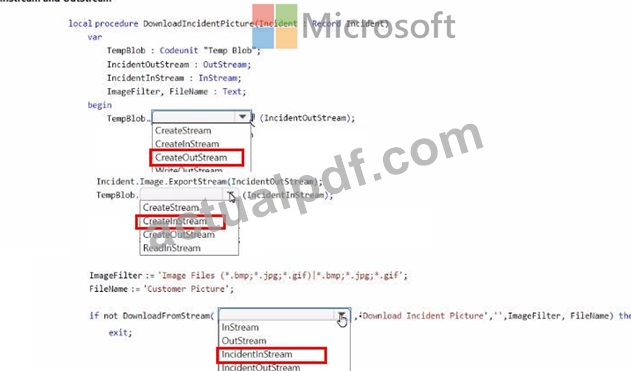
NEW QUESTION # 30
You need to select the appropriate page types to solve the reporting requirements.
Which page types should you use? To answer, select the appropriate options in the answer area.
NOTE; Each correct selection is worth one point.
Answer:
Explanation:
NEW QUESTION # 31
You are developing an app that will be published to Microsoft AppSource.
The app requires code analyzers to enforce some rules. You plan to add the analyzers to the settings.json file.
You need to activate the analyzers for the project.
Which three code analyzers should you activate to develop the app for AppSource? Each correct answer presents part of the solution NOTE: Each correct selection is worth one point.
- A. a custom rule set
- B. AppSourceCop
- C. UlCop
- D. CodeCop
- E. PerTenantExtensionCop
Answer: B,D,E
Explanation:
When developing an app for Microsoft AppSource, it is crucial to adhere to specific guidelines and standards to ensure compatibility and compliance. The three code analyzers you should activate are:
CodeCop (A): This is the default analyzer for AL language extensions. It enforces the AL Coding Guidelines, ensuring that the code follows best practices for readability, maintainability, and performance. It checks for a wide range of issues, from syntax errors to best practice violations, making it essential for any AL development.
PerTenantExtensionCop (D): This analyzer is specifically designed for extensions that are intended to be installed for individual tenants. It includes rules that ensure the extension does not interfere with the per-tenant customizations and adheres to the guidelines for extensions that can be safely installed and uninstalled without affecting the underlying application.
AppSourceCop (E): This analyzer is tailored for extensions that are intended for publication on Microsoft AppSource. It enforces additional rules that are specific to AppSource submissions, such as checking for the use of reserved object ranges and ensuring that all prerequisite dependencies are correctly declared. This is crucial for ensuring that your app meets all the requirements for listing on AppSource.
By activating these three analyzers, developers can ensure their app adheres to the standards required for AppSource, as well as maintain high code quality and compatibility with Business Central.
NEW QUESTION # 32
You are developing a test application to test the posting process of a sales order. You must provide the following implementation:
* Specify the value of post options (dialog: Ship, Invoice, Ship & Invoice) as Invoice.
* Perform calculations and values checking.
You need to complete the development of the test codeunit.
Which methods should you use? To answer, move the appropriate methods to the correct implementation. You may use each method once, more than once, or not at all. You may need to move the split bar between panes or scroll to view content.
NOTE: Each correct selection is worth one point.
Answer:
Explanation:
NEW QUESTION # 33
You need to call the Issue API action from the mobile application.
Which action should you use?
- A. POST /issues (88122e0e-5796-ec11 -bb87-000d3a392eb5)/Copy
- B. POST /issues (88122e0e-5796-ec11 -bb87-000d3a392eb5)/copy
- C. POST/issues (88122e0e-5796-ec11-bb87-000d3a392eb5yMicrosoit.NAV.copy
- D. POST/issues(88122e0e-5796-ec11-bb87-000d3a392eb5)/MicrosoftNAV.Copy
- E. PATCH /issues {88122 eOe-5796-ed 1 -bb87-000d3a392eb5)/Mkrosotl.NAV.Copy
Answer: A
Explanation:
In the context provided by the case study, when calling an API action from a mobile application, the correct format for a POST request to an action in Business Central typically involves specifying the entity (/issues), the ID of the entity (88122e0e-5796-ec11-bb87-000d3a392eb5), and the action to be called (/Copy). The action name should match the exact name as defined in the AL code, which is case-sensitive.
Option A is incorrect because it uses a non-standard format for the action call.
Option B uses the PATCH method, which is generally used for update operations, not for calling actions.
Option C is correct as it uses the POST method, which is appropriate for calling actions, and correctly specifies the entity, ID, and action name.
Option D is incorrect because the action name /copy is in lowercase, while AL is case-sensitive, and it should match the case exactly as defined in the code.
Option E incorrectly adds 'MicrosoftNAV' before the action name, which is not standard for calling actions in Business Central APIs.
Hence, the correct action to use when calling the Issue API action from the mobile application is given in Option C.
NEW QUESTION # 34
......
Latest MB-820 Exam Dumps Microsoft Exam from Training: https://www.actualpdf.com/MB-820_exam-dumps.html
Pass Microsoft MB-820 PDF Dumps Recently Updated 58 Questions: https://drive.google.com/open?id=1MHFv9_Y2x_kZgHZl1vPK3E8ymR3sep7g
