

Free 365 Days Exam Updates MS-700 dumps with test Engine Practice
Updated Verified MS-700 dumps Q&As - 100% Pass Guaranteed
The Microsoft MS-700 exam consists of 40-60 multiple-choice questions, and candidates have 150 minutes to complete it. MS-700 exam covers a range of topics, including best practices for Teams governance, security and compliance, and how to manage collaboration and communication features within Teams. Passing the MS-700 exam demonstrates that the candidate has the knowledge and skills necessary to manage Microsoft Teams effectively, and it can be a valuable asset for IT professionals looking to advance their careers in this field.
NEW QUESTION # 45
You have a Microsoft 365 subscription.
You need to create a new Microsoft Teams team named Human Resources that meets the following requirements:
All join requests must be approved by an owner of the team.
The URL for the Microsoft SharePoint Online site of the team must be /teams/HR.
Two users named [email protected] and [email protected] must be assigned as team owners.
How should you complete the PowerShell command? To answer, select the appropriate options in the answer area.
NOTE: Each correct selection is worth one point.
Answer:
Explanation:
Explanation
Reference:
https://docs.microsoft.com/en-us/powershell/module/teams/new-team?view=teams-ps
https://docs.microsoft.com/en-us/powershell/module/teams/add-teamuser?view=teams-ps
NEW QUESTION # 46
Your company has a Microsoft Office 365 subscription.
The company has the departments and teams shown in the following table.
You need to ensure that only the following apps appear in the app bar of the Microsoft Teams client for only the events department:
* Activity
* Shifts
* Chat
What should you do first?
- A. Modify the global app setup policy.
- B. Modify the global app permission policy.
- C. Create a custom app setup policy.
- D. Create a custom app permission policy.
Answer: C
Explanation:
Reference:
https://docs.microsoft.com/en-us/microsoftteams/teams-app-setup-policies#assign-a-custom-app-setup-policyto-u
NEW QUESTION # 47
You plan to implement Microsoft Teams for 300 users.
For the first stage of the deployment, you will enable the following features:
* Audio
* Video
* Screen sharing
Users will be prevented from using the following features:
* File sharing
* PSTN calling
* Conference audio
* Conference video
* Conference screen sharing
You need to calculate how much network bandwidth is required for the first-stage deployment. What should you use?
- A. Bandwidth Utilization Analyzer
- B. Network Assessment Tool
- C. Network Planner
- D. Advisor for Teams
Answer: C
Explanation:
According to the Microsoft documentation1, you can use Network Planner in the Microsoft Teams admin center to calculate how much network bandwidth is required for your Teams deployment. Network Planner helps you determine and organize network requirements for connecting your organization to Teams. You can use Network Planner to:
Input your organization's information, such as the number of users, sites, and expected call and meeting scenarios.
Get a report that tells you if your network can support Teams.
Get a report that tells you what network hardware you need to support Teams.
To use Network Planner, you need to follow these steps1:
In the left navigation of the Microsoft Teams admin center, go to Org-wide settings > Network planner.
Under Overview, click Download the Network Planner Excel template.
Open the template and enter information about your organization's sites, users, and expected call and meeting scenarios.
Save the template and then upload it in Network Planner.
Under Calculated results, view the reports that show you the estimated network requirements for Teams.
NEW QUESTION # 48
Your company uses Teams.
Two users named User 1 and User2 use the Teams client few Windows. The users report the following issues;
* User1 reports that when attempting to sign in, the Teams client remains on the sign-in page.
* User2 reports receiving an error when attempting to screen share during a Teams meeting.
You need to troubleshoot the issues.
Which client-side log should you review for each user? To answer, drag the appropriate logs to the correct users. Each log may be used once more than once, or not at all. You may need to drag the split bar between panes or scroll to view content.
NOTE: Each correct selection is worth one point.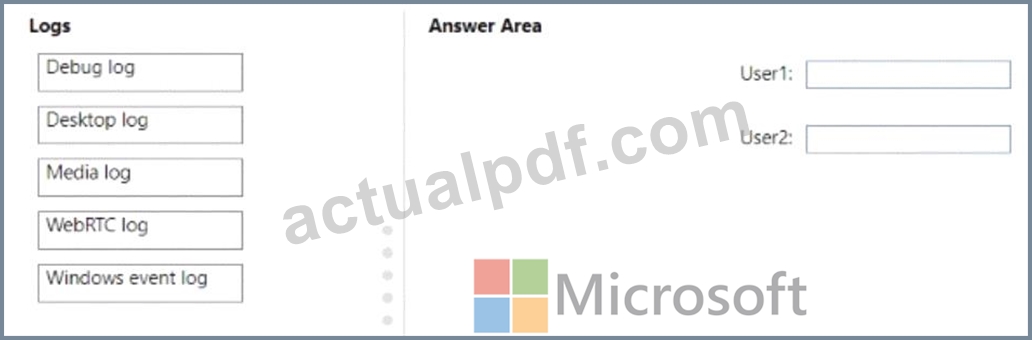
Answer:
Explanation:
Explanation:
NEW QUESTION # 49
You need to recommend which inbound ports to the network and outbound ports to Office 365 must be allowed on the company's firewall after the planned upgrade. The solution must meet the security requirements.
Which inbound and outbound ports should you recommend? To answer, select the appropriate options in the answer area.
NOTE: Each correct selection is worth one point.
Answer:
Explanation:
Reference:
https://docs.microsoft.com/en-us/microsoftteams/microsoft-teams-online-call-flows
NEW QUESTION # 50
You have a Microsoft 365 ES subscription that uses Teams.
The sales department at your company requires that a toll-free number appear at the top of a list of numbers on Microsoft Outlook invites to Teams meetings.
Which four actions should you perform in sequence? To answer, move the appropriate actions from the list of actions to the answer area and arrange them in the correct order.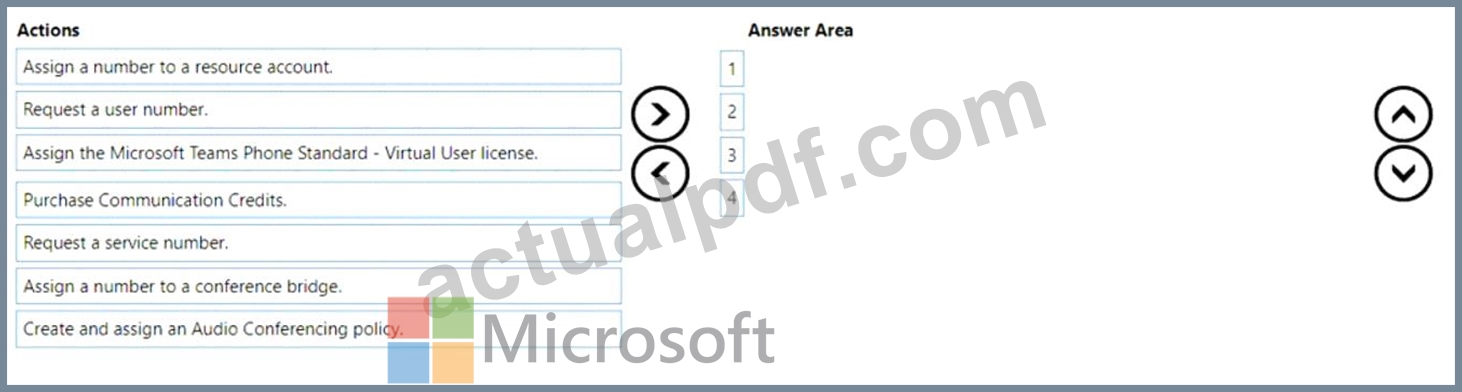
Answer:
Explanation: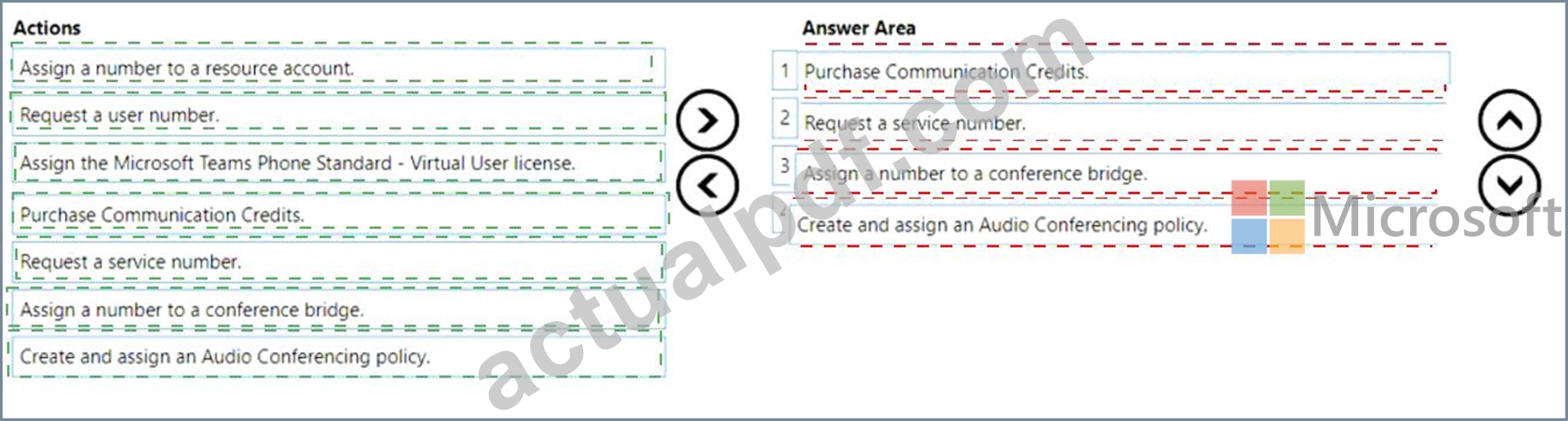
Explanation
Graphical user interface Description automatically generated
According to the Microsoft documentation1, you can use Audio conferencing policies to manage audio conferencing toll and toll-free numbers to be displayed in meeting invites created by users within your organization. You can use one of the two automatically created policies or create and assign custom policies. To create a custom audio-conferencing policy, you need to follow these steps1:
In the left navigation of the Microsoft Teams admin center, go to Meetings > Audio conferencing.
Select Add.
Enter the name and description of the policy. The name can't contain special characters or be longer than 64 characters.
Choose whether or not to Include toll-free numbers in meetings created by users of this policy.
Under Phone numbers included in meeting invites, select Add phone number, and then select the toll-free number that you want to appear at the top of the list of numbers on Outlook invites to Teams meetings. You can also add other phone numbers that you want to include in the meeting invites.
Select Save.
Therefore, based on this information, the correct sequence of actions is:
Purchase Communication Credits.
Request a service number.
Assign a number to a resource account.
Create and assign an Audio Conferencing policy.
NEW QUESTION # 51
Note: This question is part of a series of questions that present the same scenario. Each question in the series contains a unique solution that might meet the stated goals. Some question sets might have more than one correct solution, while others might not have a correct solution.
After you answer a question in this section, you will NOT be able to return to it. As a result, these questions will not appear in the review screen.
You have a Microsoft 365 subscription that contains several Microsoft SharePoint Online sites.
You need to ensure that the content stored in a SharePoint modern team site named Sales is available from Microsoft Teams. The solution must ensure that when a new channel is added to a team, a folder for the channel is created in the Sales site.
Solution: From a team, you add a tab for the Sales site.
Does this meet the goal?
- A. No
- B. Yes
Answer: B
Explanation:
Reference:
https://techcommunity.microsoft.com/t5/microsoft-sharepoint-blog/what-is-modern-sharepoint-and-why-should-
NEW QUESTION # 52
You need to implement the planned changes for Viva Connections.
Which three actions should you perform in sequence? To answer, move the appropriate actions from the list of actions to the answer area and arrange them in the correct order.
Answer:
Explanation:
Explanation: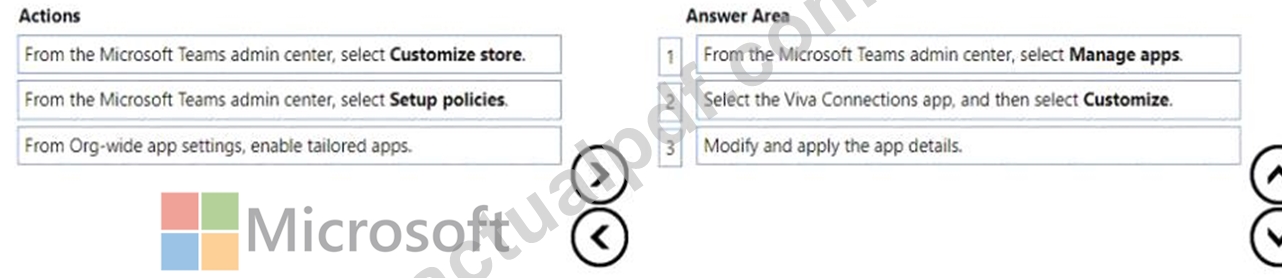
NEW QUESTION # 53
You have a Microsoft 365 subscription that contains the users shown in the following table.
The subscription contains the Microsoft Teams teams shown in the following table
You need to identify how many additional org-wide teams you can create in the subscription. and which users can create the org-wide teams?
What should you identity? To answer, select the appropriate options in the answer area.
NOTE: Each correct selection is worth one point
Answer:
Explanation:
Explanation:
NEW QUESTION # 54
You need to configure Microsoft Teams to meet the department upgrade requirements.
For each of the following statements, select Yes if that statement is true. Otherwise, select No.
NOTE: Each correct selection is worth one point.
Answer:
Explanation:
Explanation
Reference:
https://docs.microsoft.com/en-us/microsoftteams/teams-and-skypeforbusiness-coexistence-and-interoperability
NEW QUESTION # 55
Your company has a Microsoft Office 365 subscription.
A user reports that a conference call on October 2 had poor audio quality.
You view the call history as shown in the Call History exhibit. (Click the Call History tab.)
You view the call analytics as shown in the Call Analytics exhibit. (Click the Call Analytics tab.)
For each of the following statements, select Yes if the statement is true. Otherwise, select No.
NOTE: Each correct selection is worth one point.
Answer:
Explanation:
Explanation
NEW QUESTION # 56
You need to recommend which inbound ports to the network and outbound ports to Office 365 must be allowed on the company's firewall after the planned upgrade. The solution must meet the security requirements.
Which inbound and outbound ports should you recommend? To answer, select the appropriate options in the answer area.
NOTE: Each correct selection is worth one point.
Answer:
Explanation:
Reference:
https://docs.microsoft.com/en-us/microsoftteams/microsoft-teams-online-call-flows
Topic 2, Litware, inc
General Overview
Litware, Inc. is an international manufacturing company that has 4,000 users. The company has the following four departments:
IT
HR
R&D
Sales
Physical locations
Litware has two main offices. The offices are located in New York and London.
All offices connect to each other by using a WAN link. Each office connects directly to the Internet.
Existing environment
All user accounts have an Azure Active Directory Premium Plan P1 license.
Litware has a Microsoft 365 subscription that has Office 365 Enterprise E3 licenses for all users. All the E3 products and services are enabled for each user.
Litware uses Microsoft Skype for Business Online.
Requirements
Planned Upgrade
Litware identifies the following requirements for a planned upgrade from Skype for Business Online to Microsoft Teams:
Provide high quality audio, video, and online meeting experience for Microsoft Teams end users.
Implement a data retention solution in Microsoft Teams.
Minimize costs and administrative effort.
Use the principle of least privilege.
For the sales department, Litware plans to create a team that dynamically updates its membership when users leave and join the department.
Department Upgrade Requirements
Litware plans to implement upgrade requirements for the departments as shown in the following table.
Microsoft Teams Requirements
All teams must meet the following requirements:
Only users in a partner company that uses a domain named fabrikam.com must be able to collaborate in teams by using guest accounts.
Only users in the compliance department of Litware must be able to create teams.
Planned Network Tasks
Litware identifies the following network validation tasks:
An administrator named Admin5 must be able to review the required bandwidth to support audio conferencing, video conferencing, and screen sharing in Microsoft Teams.
An administrator named Admin6 must be able to review network issues that cause poor call quality reported by users.
Data Retention Requirements
Litware identifies the following data retention requirements:
Requirement1: All messages in team collaborations must be deleted after seven years.
Requirement2: all files used in team collaborations must be retained for five years.
Requirement3: All files used in personal chats must be retained for five years.
Device Requirements
You provide Microsoft Teams-certified IP phones to users in the IT and R&D departments. Each device must meet the following requirements:
The time zone on the phones used by the R&D department must be set to UTC-8.
The time zone on the phones used by the IT department must be set to UTC-5.
All phones must lock automatically after 60 seconds of inactivity.
Voice Pilot Requirements
Litware wants to pilot Phone System as a calling solution for 20 IT department users. The pilot project will receive phone numbers from Microsoft Teams.
Collaboration and Meeting Requirements
Litware identifies the following collaboration and meeting requirements:
Cloud recording must be disabled for all Microsoft Teams meetings organized by users in the HR departments only.
Meeting email invitations must be customized to include the Logo URL, Legal URL, and Help URL of Litware.
NEW QUESTION # 57
You have a Microsoft 365 tenant that uses Microsoft Skype for Business on-premises.
You plan to upgrade to Microsoft Teams in stages based on groups. The features required by each group are shown in the following table.
How should you configure the upgrade policy for the groups? To answer, select the appropriate options in the answer area.
Answer:
Explanation:
Reference:
https://docs.microsoft.com/en-us/microsoftteams/migration-interop-guidance-for-teams-with-skype
NEW QUESTION # 58
You have a Microsoft 365 subscription named contoso.com that uses Microsoft Teams and contains the users shown in the following table.
In Azure AO. the External collaboration settings are configured as shown in the exhibit (Click the Exhibit tab).
Allow guest access in Teams is set to On.
You have a team named Project! that contains the users shown in the following table.
Both User1 and User3 are owners of a learn named Project1. User2 is a member of Project1.
For each of the following statements, select Yes if the statement is true. Otherwise, select No.
NOTE: Each correct selection is worth one point.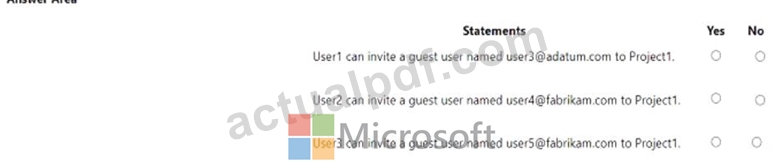
Answer:
Explanation:
Explanation:
NEW QUESTION # 59
Your company has a Microsoft Office 365 subscription.
All users use an email domain named @adatum.com.
You have the guest access settings shown in the Guest Access exhibit. (Click the Guest Access tab.)
You have the organizational relationship settings shown in the Organizational Relationship exhibit. (Click Organizational Relationship tab.)
You have a meeting policy that is configured as shown in the Meeting Policy exhibit. (Click the Meeting Policy tab.)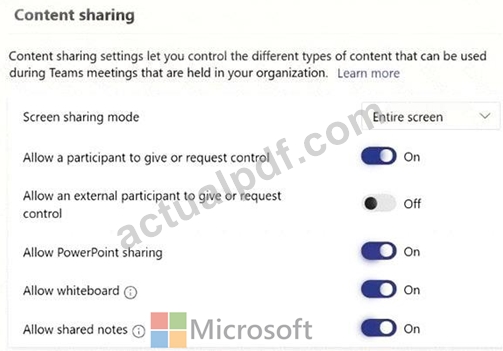
For each of the following statements, select Yes if the statement is true. Otherwise, select No.
NOTE: Each correct selection is worth one point.
Answer:
Explanation:
Explanation
Reference:
https://docs.microsoft.com/en-us/azure/active-directory/b2b/allow-deny-list
NEW QUESTION # 60
You are a Microsoft Teams administrator for your company.
You have the Org-wide app settings shown in the App Settings exhibit. (Click the App Settings tab.)
The company's global app permission policy is configured as shown in the Permission Policy exhibit. (Click the Permission Policy tab.)
The company's global app setup policy is configured as shown in the Setup Policy exhibit. (Click the Setup Policy tab.)
For each of the following statements, select Yes if the statement is true. Otherwise, select No.
NOTE: Each correct selection is worth one point.
Answer:
Explanation: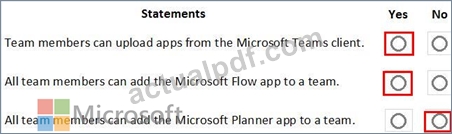
Reference:
https://docs.microsoft.com/en-us/microsoftteams/teams-app-permission-policies
https://office365itpros.com/2019/08/12/using-teams-app-permission-policies/
https://docs.microsoft.com/en-us/microsoftteams/teams-custom-app-policies-and-settings
NEW QUESTION # 61
You need to recommend a voice topology for the departments. The topology must meet the calling requirements and the security requirements.
What should you recommend for each department? To answer, select the appropriate options in the answer area.
NOTE: Each correct selection is worth one point.
Answer:
Explanation:
Reference:
https://docs.microsoft.com/en-us/microsoftteams/direct-routing-landing-page
https://docs.microsoft.com/en-us/microsoftteams/calling-plan-landing-page
https://docs.microsoft.com/en-us/skypeforbusiness/skype-for-business-hybrid-solutions/plan-your-phone-system-cloud-pbx-solution/plan-skype-for-business-cloud-connector-edition
Topic 1, Contoso, Ltd
Existing Environment
Active Directory
The network contains an on-premises Active Directory domain. All user accounts are in departmental organizational units (OUs).
Microsoft Office 365
All users are assigned a Microsoft Office 365 E5 license and are enabled for the following services:
Microsoft Yammer
Microsoft Exchange Online
Microsoft SharePoint Online
Microsoft OneDrive for Business
Azure Active Directory (Azure AD)
Azure AD
dynamic group membership
Microsoft Skype for Business
Contoso has an on-premises deployment of Microsoft Skype for Business Server 2015. All the latest cumulative updates are installed on all the servers. The following services are used in Skype for Business Server 2015:
Meetings
PSTN calling
Instant messaging (IM)
Federation to external companies
Departments
Contoso has the following departments:
IT
Sales
Human resources (HR)
Research and deployment (R&D)
All groups are created by using dynamic group membership that use the department attribute.
Requirements
Business goals
Contoso identifies the following business goals:
Migrate the maximum number of users to Microsoft Teams.
Minimize administrative effort.
Device Requirements
Contoso identifies the following device requirements:
Replace Skype for Business IP phones with Microsoft Teams phones.
All Microsoft Teams phones must be set to lock automatically after 60 seconds.
Meeting and Live Event Requirements
Contoso identifies the following meeting and live event requirements:
Requirement1: Guest users must be able to join live events.
Requirement2: Guest users must always wait in a meeting lobby.
Requirement3: Contoso users must always bypass the meeting lobby when they join by using the Microsoft Teams client.
Requirement4: After the upgrade to Microsoft Teams, all meetings must be scheduled by using Microsoft Teams.
Calling Requirements
Contoso identifies the following calling requirements:
Migrate all existing auto attendants and response groups to Office 365.
Minimize the on-premises PSTN infrastructure.
Technical Requirements
Guest users must be prevented from making private calls.
Security Requirements
Contoso has the following security requirements for the Microsoft Teams deployment:
The number of ports allowed on the company's firewall must be limited.
Team names must be prevented from containing the name of any products produced by Contoso.
Users in the R&D group must be prevented from sending chat messages to users in other departments.
To meet the company's compliance policy, users in the sales department must continue to use on-premises Skype for Business for IM and calling only.
Pilot Project
Contoso begins a pilot project for the upgrade to Microsoft Teams.
You identify the following issues during the pilot project:
Microsoft Teams users report that they often receive continuous notifications from the Microsoft Teams client for 20 minutes.
Two pilot users in the HR department report that they are not members of the HR team.
NEW QUESTION # 62
Task 3
Adele Vance Is a member of your company s technology adoption team.
You need to provide only Adele with the ability to turn on and off Teams preview features.
Answer:
Explanation:
To provide only Adele Vance with the ability to turn on and off Teams preview features, you need to create and assign a custom update policy for her. Here are the steps to do so:
* Sign in to the Microsoft Teams admin center with your Microsoft 365 username and password1.
* In the left navigation, go to Teams > Teams Update policies.
* Select Add to create a new policy or select an existing policy to open Update policy.
* Name the update policy, add a description, and select Enabled from the drop-down menu for Allow public preview. This option enables Teams Public Preview regardless of whether a user is enrolled in Office Current Channel (Preview). The end user must also opt in to Teams public preview in their Teams app2.
* Click Save and then Close.
* In the left navigation, go to Users and then search for Adele Vance from the list of users.
* In the user details page, go to Policies and then click Edit next to Assigned policies.
* In the Assigned policies pane, under Update policy, select the policy that you created or modified in step
4 from the drop-down menu.
* Click Apply and then Close.
Now, Adele Vance can turn on and off Teams preview features by following these steps in her Teams app3:
* Select the three dots to the left of your profile to display the Teams menu.
* Select About > Public preview.
* Select Switch to Public preview or Switch back to standard version.
NEW QUESTION # 63
......
Provide Valid Dumps To Help You Prepare For Managing Microsoft Teams Exam: https://www.actualpdf.com/MS-700_exam-dumps.html
MS-700 Dumps Questions [2024] Pass for Exam: https://drive.google.com/open?id=1pTkX0cA6KfMziQ5JjcZ9jHUIyLuSSjRg
