

 PDF Version Demo
As everyone knows, although passing SAP SAP Certified Implementation Consultant - SAP S/4HANA Cloud Private Edition, Asset Management (C_S43_2601) is difficult for IT workers, but once you pass exam and get the SAP Certified Application Associate, you will have a nice career development. ActualPDF SAP Certified Implementation Consultant - SAP S/4HANA Cloud Private Edition, Asset Management (C_S43_2601) actual test pdf can certainly help you sail through examination. Currently our product on sale is the SAP Certified Implementation Consultant - SAP S/4HANA Cloud Private Edition, Asset Management (C_S43_2601) actual test latest version which is valid, accurate and high-quality. You can rest assured that SAP Certified Implementation Consultant - SAP S/4HANA Cloud Private Edition, Asset Management (C_S43_2601) actual test pdf helps 98.57% candidates achieve their goal. Every year there are more than 100000+ candidates who choose us as their helper for SAP SAP Certified Implementation Consultant - SAP S/4HANA Cloud Private Edition, Asset Management (C_S43_2601).
Why are our C_S43_2601 actual test pdf so popular among candidates? Why do so many candidates choose us? Because we are not only offering the best C_S43_2601 actual test latest version but also 100% service satisfaction.
The details are below:
Firstly, we run business many years, we have many old customers; also they will introduce their friends, colleagues and students to purchase our SAP Certified Implementation Consultant - SAP S/4HANA Cloud Private Edition, Asset Management (C_S43_2601) actual test pdf. We think highly of every customer and try our best to serve for every customer, so that our SAP Certified Implementation Consultant - SAP S/4HANA Cloud Private Edition, Asset Management (C_S43_2601) actual test latest version is sold by word of mouth. Since so many years our education experts is becoming more and more professional, the quality of our SAP Certified Implementation Consultant - SAP S/4HANA Cloud Private Edition, Asset Management (C_S43_2601) actual test pdf is becoming higher and higher. Meanwhile, the passing rate is higher and higher.
Secondly, we have good reputation in this field that many people know our passing rate of C_S43_2601 actual test latest version is higher than others; our accuracy of actual test dumps is better than others. Our SAP Certified Implementation Consultant - SAP S/4HANA Cloud Private Edition, Asset Management (C_S43_2601) actual test pdf has many good valuable comments on the internet. Many authorities recommend our actual test dumps to their acquaintances, students and friends for reference.
Thirdly, normally our C_S43_2601 actual test pdf contains about 80% questions & answers of actual exam. Most candidates can pass exams with our C_S43_2601 actual test dumps. We have three versions for every SAP Certified Implementation Consultant - SAP S/4HANA Cloud Private Edition, Asset Management (C_S43_2601) actual test pdf. 63% candidates choose APP on-line version. We guarantee your money safety that if you fail exam unfortunately, we can refund you all cost about the SAP Certified Implementation Consultant - SAP S/4HANA Cloud Private Edition, Asset Management (C_S43_2601) actual test pdf soon. Or you would like to wait for the update version or change to other exam actual test dumps, we will approve of your idea. We have one year service warranty that we will serve for you until you pass. Believe me, No Pass, Full Refund, No excuse!
Fourthly, our service is satisfying. Our guideline for our service work is that we pursue 100% satisfaction. We use our SAP Certified Implementation Consultant - SAP S/4HANA Cloud Private Edition, Asset Management (C_S43_2601) actual test pdf to help every candidates pass exam. Any questions or query will be answered in two hours. We are 7*24 on-line working even on official holidays.
If you are interested in purchasing C_S43_2601 actual test pdf, our ActualPDF will be your best select. If you want to know more products and service details please feel free to contact with us, we will say all you know and say it without reserve. Trust me, our SAP Certified Implementation Consultant - SAP S/4HANA Cloud Private Edition, Asset Management (C_S43_2601) actual test pdf & SAP Certified Implementation Consultant - SAP S/4HANA Cloud Private Edition, Asset Management (C_S43_2601) actual test latest version will certainly assist you to pass SAP SAP Certified Implementation Consultant - SAP S/4HANA Cloud Private Edition, Asset Management (C_S43_2601) as soon as possible.
SAP C_S43_2601 Exam Syllabus Topics:
| Section | Weight | Objectives |
|---|---|---|
| User Experience and SAP Fiori | 1%-10% | - SAP Fiori Applications
|
| Organizational Units and Master Data | 11%-20% | - Enterprise Structure
|
| Maintenance Processing | 21%-30% | - Maintenance Execution
|
| Preventive Maintenance | 11%-20% | - Maintenance Planning
|
| Analytics and Reporting | 1%-10% | - Reporting Capabilities
|
| Refurbishment and Spare Parts Processing | 1%-10% | - Spare Parts Management
|
| Technical Objects | 11%-20% | - Technical Object Master Data
|
| Integration and Extensibility | 1%-10% | - Cross-Application Integration
|
SAP Certified Implementation Consultant - SAP S/4HANA Cloud Private Edition, Asset Management (C_S43_2601) Sample Questions:
Use Phase-Based Maintenance Processing
The project team evaluates during the implementation project Phase-Based Maintenance Processing in SAP S
/4HANA Asset Management. The following features need to be checked:
* Initiate and screen a Maintenance Notification
* Plan Maintenance Order and send it for approval
* Create a Maintenance Notification using an already available notification type which is suitable for phase-based maintenance and save it.
Use the following data:
* Screen and accept the just created Maintenance Notification.
* Create an Order (Phase-based) for your accepted notification and submit it for approval.
Use the following data: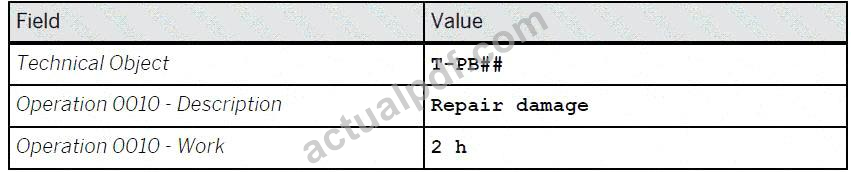
Correct Answer:
See the Explanation for complete Solution of this Task.
Explanation:
Task 10 Overview
This task evaluates your ability to manage the newer, phase-led maintenance workflow in SAP S/4HANA.
Unlike the traditional "emergency" repair you did earlier, this process includes formal screening and approval steps Step 1: Create a Phase-Based Maintenance Notification In this step, you initiate the request.
* Access the Transaction : Use transaction IW21 or the Fiori app Create Maintenance Request .
* Select Notification Type : Use a type configured for phase-based maintenance (typically Y1 - Maintenance Request ).
* Enter the Following Data :
* Technical Object : T-PB48
* Description : Defective pump (phase-based)
* Current Location : Production Line 1
* Detection Method : Continuous Condition Monitoring
* Operational Effect : Production restricted
* Save : Note the notification number generated.
Explanation : This step "initiates" the maintenance process. In phase-based maintenance, the notification starts in the Initiation phase, where it must be reviewed before any work is planned.
Step 2: Screen and Accept the Notification
As a "Maintenance Coordinator," you must now review the request.
* Access the Fiori App : Open Screen Maintenance Requests .
* Locate Your Notification : Find the notification you just created for T-PB48.
* Perform Screening :
* Review the details to ensure they are complete.
* Click Accept to move it to the next phase.
Explanation : "Screening" is a quality gate. It ensures that the maintenance team only spends time planning valid, well-described issues. Once accepted, the notification moves from the Initiation phase to the Screening phase and finally becomes available for planning.
Step 3: Create and Plan the Phase-Based Order
Now you will create the formal work order for the accepted request.
* Create Order : From within the accepted notification, or using the Manage Maintenance Backlog app, choose to Create Order .
* Enter Planning Data :
* Technical Object : T-PB48
* Operation 0010 Description : Repair damage
* Operation 0010 Work : 2 h
* Submit for Approval : Look for the Submit for Approval button at the top of the order screen.
Explanation : This step moves the order into the Planning phase. By submitting it for approval, you are requesting the budget and resources to perform the work. The order status will change to indicate it is
"Waiting for Approval"
Create a Maintenance Plan
The project team evaluates during the implementation project Maintenance Plans in SAP S/4HANA Asset Management. The following features need to be checked:
Create a Maintenance Plan
Create a Maintenance Plan and save it. Use the following information: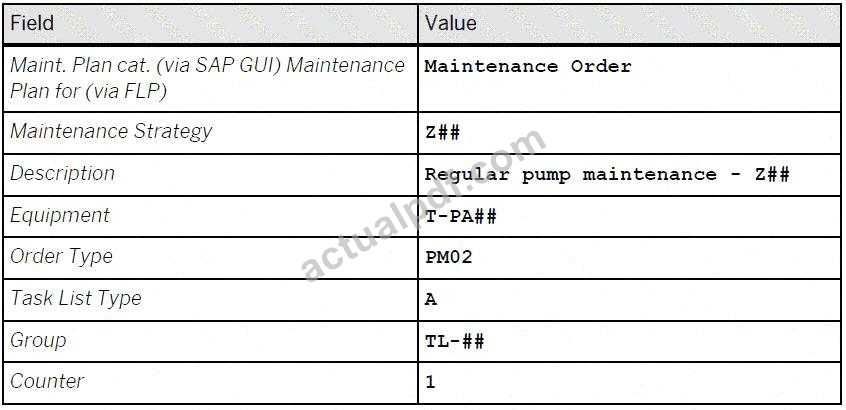
Correct Answer:
See the Explanation for complete Solution of this Task.
Explanation:
Task 8: Create a Maintenance Plan
The objective of this task is to create a strategy-based maintenance plan that will automatically generate work orders for your pump based on the frequencies defined in your task list.
Step 1: Access the Transaction
* Transaction Code : Enter IP42 in the command field and press Enter .
* Initial Screen :
* Maintenance Plan Category : Select Maintenance Order (or "Maintenance plan for Maintenance Order" if using the Fiori Launchpad).
* Maintenance Strategy : Enter Z48 .
* Press Enter .
Step 2: Enter Header and Maintenance Item Data
Once you are on the main creation screen, fill in the "Maintenance Item" section to define what is being maintained and how the orders should look:
* Description : Enter Regular pump maintenance Z48 .
* Equipment : Enter T-PA48 .
* Planning Plant : This should default to 1010 based on the equipment, but ensure it is correct.
* Order Type : Enter PM02 .
Explanation : By assigning Equipment T-PA48 and Order Type PM02 , you are telling SAP to generate a specific "Planned" maintenance order every time this schedule is triggered.
Step 3: Link the Task List
This step connects the plan to the specific maintenance steps (operations) you created in Task 7.
* Look for the Task List section at the bottom of the screen.
* Task List Type : Enter A (General Task List).
* Group : Enter TL-48 .
* Counter : Enter 1 .
* Press Enter to validate the connection. You should see the description "Regular Maintenance GR48" appear.
Explanation : Linking the Task List ensures that when the maintenance plan generates an order, it automatically copies the 30-minute operations you defined earlier into that order.
Step 4: Set Scheduling Parameters (Optional but Recommended)
While the table in your document focuses on the data above, typically you would click the Maintenance Plan Scheduling Parameters tab to ensure the "Scheduling Period" and "Start Date" are set. However, for the assessment, the mandatory data is what we entered in Steps 1-3.
Step 5: Save
* Click the Save (floppy disk) icon.
* Note your Maintenance Plan Number : The system will display a message at the bottom, such as
"Maintenance plan 123 saved." Write this number down , as you will need it for Task 9: Schedule a Maintenance Plan .
Task 8 is now complete! You have built the automated "brain" that will handle the recurring maintenance for your pump.
Viewing page 1 out of 6 pages.
Viewing questions 1-2 out of 12 questions.


